csprimer-computersystem-concept4
053 What happens in the compilation pipeline
Call → Compile assemble link load
main.c (source) → assemble code → main.o → a.out(binary)
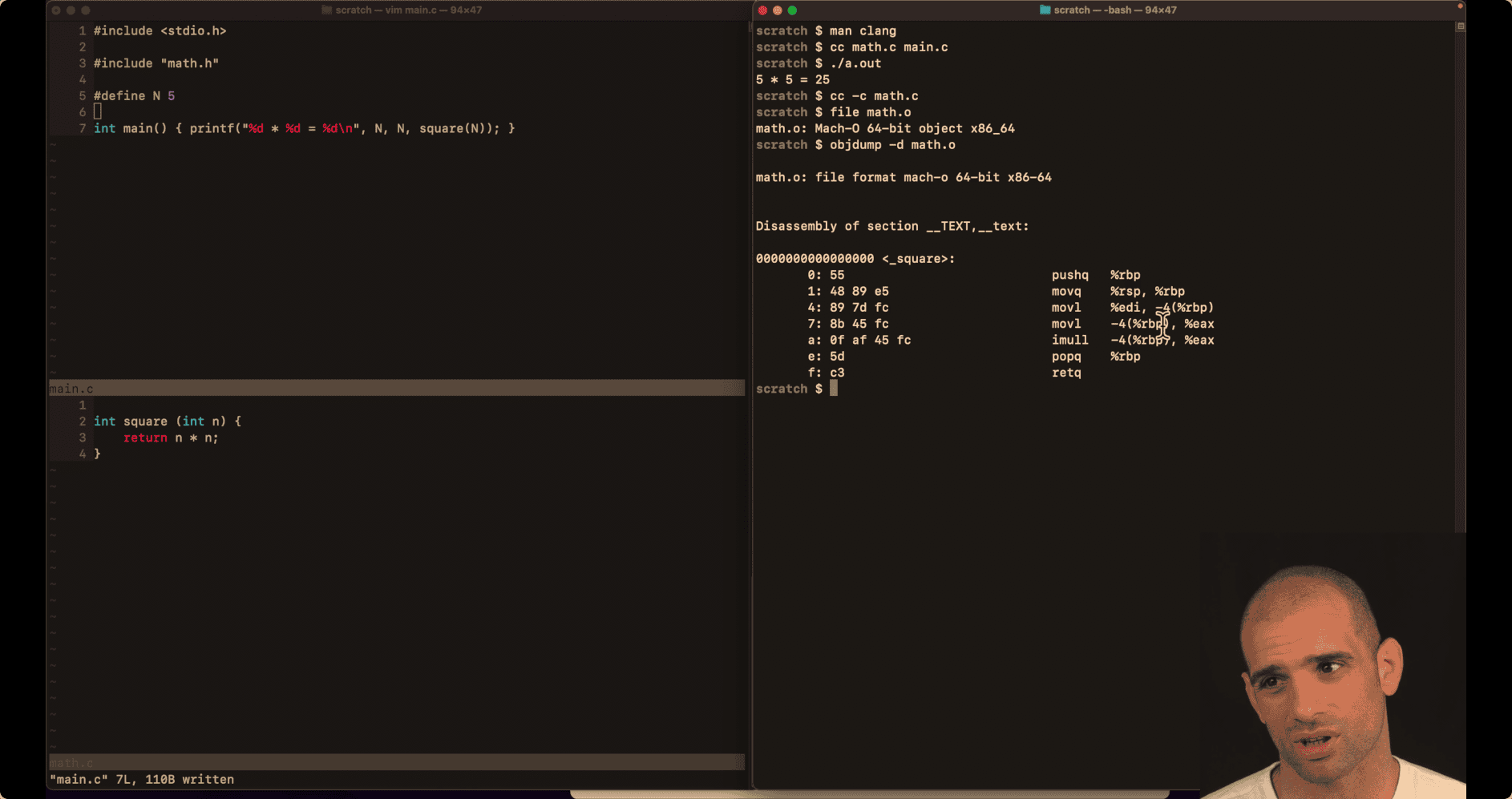
objdump hexdump
cc -c → math.c → obj without link method 1: cc (two .c) ./a.out
method2: cc -c main.c cc main.o math.o ./a.out
man clang → short view of how Complier do, parts
cc -E main.c -E Run the preprocessor stage.
- this is the Preprocessing output
Assembling output: (llvm process)
cc -S main.c -S Run the previous stages as well as LLVM generation and optimization stages and target-specific code generation, cat main.s
045 Helping Max rotate bits right
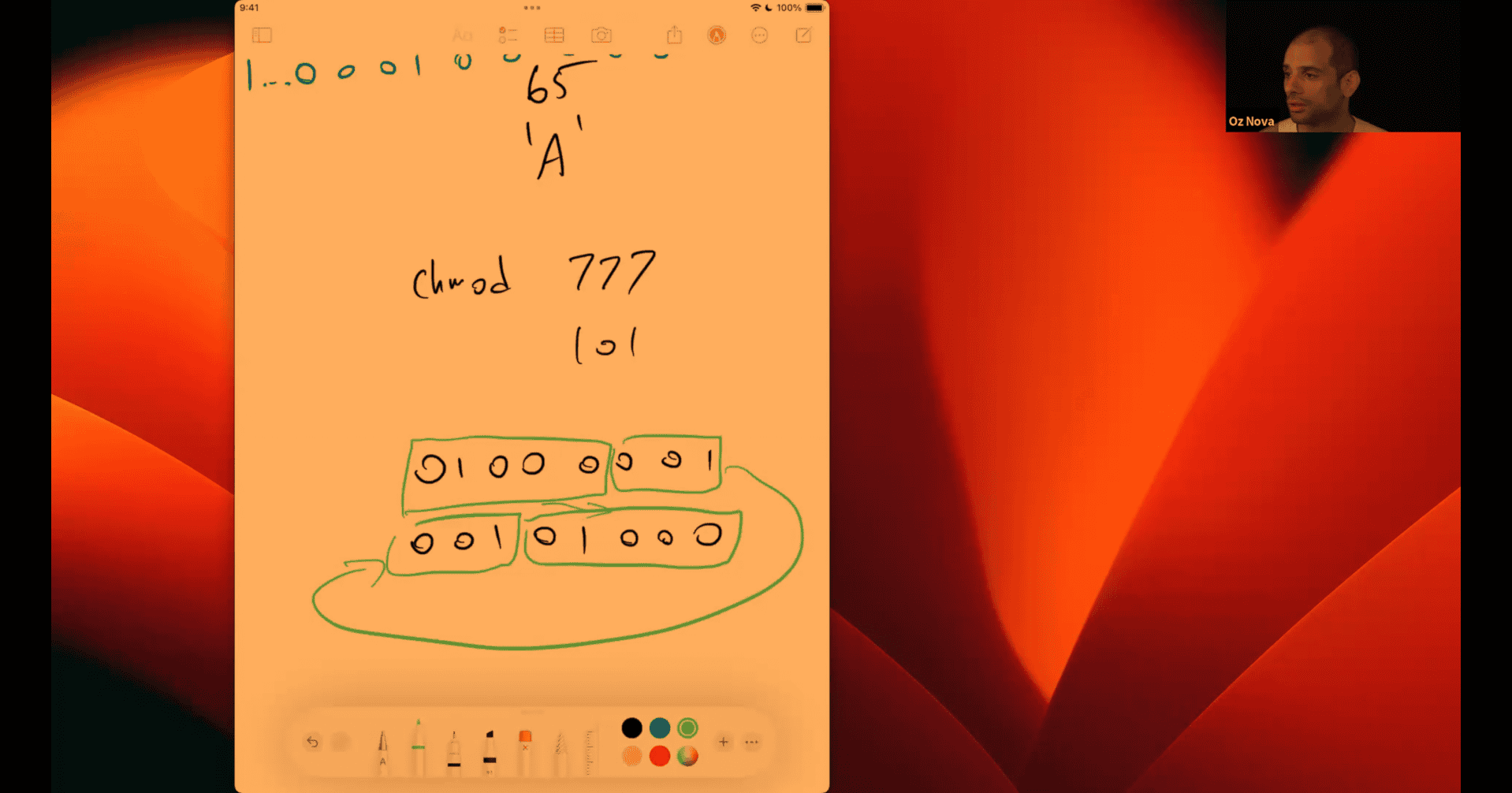 unsigned 8 bits
 copy that part → add or shift 1 and then combine the other part
in node:
-8 >>1 -4 -8 >>>1 (it will give positive number ) 2147483644
if it is signed int, need to use logical right shift
number → first digit bit → second digit
cpu : arithmetical shift or logical shift
extra ai finding % and & (out topic)
Let’s use k = 19 and n = 8:
19in binary:000100118in binary:00001000n - 1 = 7in binary:00000111
Bitwise operation:
   00010011   (19)
&  00000111   (7)
------------
   00000011   (3)
So, 19 & 7 = 3
Math operation:
19 % 8 = 3
Result:
Both 19 % 8 and 19 & 7 give 3, because & 7 keeps only the last 3 bits, which is the remainder when dividing by 8.
only when k is a power of 2 (like 2, 4, 8, 16, etc.) can you use x & (k - 1) instead of x % k.
For other values of k, this does not work.
Example:
- For
x = 7,k = 5:7 % 5 = 27 & 4 = 4(wrong result)
So, usex & (k - 1)only whenkis a power of 2.
- some bit review:
Original n: 101100
n - 1: 101011
n & (n - 1): 101000
Step-by-step:
- The rightmost 1 in 101100 is at position 2 (from the right).
- Subtracting 1 flips that 1 to 0 and all trailing 0s to 1s: 101011.
- ANDing:
101100
& 101011
= 101000
n & (n - 1):Result: The rightmost 1 is cleared.
n & 1 checks if the rightmost bit of n is 1 (odd) or 0 (even).
Example:
n = 6 (binary: 110)
n & 1 = 110 & 001 = 000 → result is 0 (even)
n = 7 (binary: 111)
n & 1 = 111 & 001 = 001 → result is 1 (odd)
So, n & 1 extracts the least significant bit.
| Method | Iterations Needed | Performance Benefit |
|---|---|---|
n >>= 1 >> = | Up to 32 | Slower for sparse bits |
n &= (n-1) | Only set bits (Hamming weight) | Faster overall |
bool ispangram(char *s) {
  uint32_t bs = 0;
  char c;
  while (*s != '\n') {
    /* c = tolower(*s); */
    /* s++; */
    c = tolower(*s++);
    if (c < 'a' || c > 'z')
      continue;
    bs |= 1 << (c - 'a');
  }
  // TODO implement this!
  return bs == 0x03ffffff; // how is  this 26 bits are set
//So, `return bs == 0x03ffffff;` returns true only if all 26 letters were found.
}
bs (binary): 00000000000000000000000000
              ^                        ^
             'a'                     'z'
Suppose the string is “bad”:
-
Start: bs = 00000000000000000000000000
-
For ‘b’:
- ‘b’ - ‘a’ = 1
- Set bit 1:
bs = 00000000000000000000000010
-
For ‘a’:
- ‘a’ - ‘a’ = 0
- Set bit 0:
bs = 00000000000000000000000011
-
For ‘d’:
- ‘d’ - ‘a’ = 3
- Set bit 3:
bs = 00000000000000000000001011
Visual:
Each time a letter is found, its corresponding bit is turned ON (set to 1).
So, after “bad”, bits for ‘a’, ‘b’, and ‘d’ are set:
bs (binary): 00000000000000000000001011
              zyxwvutsrqponmlkjihgfedcba
Read from right to left:
- The rightmost bit is ‘a’, next is ‘b’, then ‘c’, etc.
- After “bad”, bits for ‘a’, ‘b’, and ‘d’ are 1.
Key Differences Between the Two Pangram Implementations
Both use bit manipulation, but there are important differences in approach and efficiency:
🔍 Character Processing
Your Version:
c = tolower(*s++);
if (c < 'a' || c > 'z')
    continue;
bs |= 1 << (c - 'a');
Vim Version:
while ((c = *s++) != '\0') {
    if (c < '@') continue; // ignore first 64 chars
    bs |= 1 << (c & 0x1f);
}
Differences:
- Your version: Uses
tolower()function call + explicit range check - Vim version: Uses bitwise AND (
& 0x1f) + simpler range check - Vim version is faster: No function call overhead
🎯 Bit Mapping
Your Version:
bs |= 1 << (c - 'a'); // 'a' maps to bit 0, 'z' maps to bit 25Vim Version:
bs |= 1 << (c & 0x1f); // 'a'/'A' maps to bit 1, 'z'/'Z' maps to bit 26Key Insight:
- Your version:
'a' - 'a' = 0, so ‘a’ uses bit 0 - Vim version:
'a' & 0x1f = 97 & 31 = 1, so ‘a’ uses bit 1 - Vim version:
'A' & 0x1f = 65 & 31 = 1, so ‘A’ also uses bit 1
🔢 Mask Comparison
Your Version:
return bs == 0x03ffffff; // 26 bits set: 00000011 11111111 11111111 11111111Vim Version:
return (bs & MASK) == MASK; // MASK = 0x07fffffe: 00000111 11111111 11111111 11111110Bit Analysis:
- Your mask:
0x03ffffff= bits 0-25 set (26 bits total) - Vim mask:
0x07fffffe= bits 1-26 set (26 bits total)
⚡ Performance Comparison
| Aspect | Your Version | Vim Version |
|---|---|---|
| Case handling | tolower() function call | Bitwise AND (faster) |
| Range check | c < 'a' || c > 'z' | c < '@' (simpler) |
| Bit calculation | c - 'a' (subtraction) | c & 0x1f (bitwise AND) |
| Bit positions | 0-25 | 1-26 |
Vim version advantages:
- No function calls (
tolower()is expensive) - Simpler range checking
- More efficient bit operations
- Case-insensitive without function calls
🎯 Why Vim Version is More Efficient
-
tolower()vs& 0x1f:// Your version: function call overhead c = tolower(*s++); // Vim version: direct bit manipulation c = *s++; // no function call -
Range checking:
// Your version: two comparisons if (c < 'a' || c > 'z') // Vim version: one comparison if (c < '@') -
Bit mapping:
// Your version: arithmetic
c - 'a'  // requires subtraction

// Vim version: bitwise
c & 0x1f  // faster bitwise operation
�� Both Work, But Vim Version is Optimized
Both implementations correctly detect pangrams, but the vim version uses more efficient bit manipulation techniques to achieve the same result with better performance. The key insight is using & 0x1f to handle case-insensitive letter mapping without function calls.
continue:
Understanding the Vim Version Bitwise Operation
Let me break down the magic of c & 0x1f with concrete examples!
🎯 The Core Trick: c & 0x1f
What 0x1f means:
0x1f= 31 in decimal =00011111in binary- It’s a mask that keeps only the last 5 bits
Why 5 bits?
- We need to represent 26 letters (a-z)
- 2⁵ = 32, so 5 bits can represent 0-31
- Perfect for our 26 letters!
📊 Bit-by-Bit Examples
Example 1: Letter ‘a’ (lowercase)
'a' = 97 decimal = 01100001 binary
0x1f = 31 decimal = 00011111 binary

'a' & 0x1f:
  01100001  (97)
& 00011111  (31)
= 00000001  (1)

So 'a' maps to bit position 1
Example 2: Letter ‘A’ (uppercase)
'A' = 65 decimal = 01000001 binary
0x1f = 31 decimal = 00011111 binary

'A' & 0x1f:
  01000001  (65)
& 00011111  (31)
= 00000001  (1)

So 'A' also maps to bit position 1!
Example 3: Letter ‘z’ (lowercase)
'z' = 122 decimal = 01111010 binary
0x1f = 31 decimal = 00011111 binary

'z' & 0x1f:
  01111010  (122)
& 00011111  (31)
= 00011010  (26)

So 'z' maps to bit position 26
🔍 Complete Letter Mapping
| Letter | ASCII | Binary | & 0x1f | Bit Position |
|---|---|---|---|---|
| ’a’/‘A’ | 97/65 | 01100001/01000001 | 1 | Bit 1 |
| ’b’/‘B’ | 98/66 | 01100010/01000010 | 2 | Bit 2 |
| ’c’/‘C’ | 99/67 | 01100011/01000011 | 3 | Bit 3 |
| … | … | … | … | … |
| ‘z’/‘Z’ | 122/90 | 01111010/01011010 | 26 | Bit 26 |
🎯 Why This Works for Case-Insensitive
The Magic:
- Uppercase ‘A’ = 65 =
01000001 - Lowercase ‘a’ = 97 =
01100001 - Both have the same last 5 bits:
00001 & 0x1fextracts only those last 5 bits!
Visual Comparison:
'A': 01000001
'a': 01100001
     ^^^^^^^^
     Last 5 bits are identical!
🔧 Step-by-Step Process
For input: “Hello”
-
‘H’ (72):
72 & 0x1f = 01001000 & 00011111 = 00001000 = 8 Set bit 8: bs |= 1 << 8 -
‘e’ (101):
101 & 0x1f = 01100101 & 00011111 = 00000101 = 5 Set bit 5: bs |= 1 << 5 -
‘l’ (108):
108 & 0x1f = 01101100 & 00011111 = 00001100 = 12 Set bit 12: bs |= 1 << 12 -
‘l’ (108): (same as above, bit already set)
-
‘o’ (111):
111 & 0x1f = 01101111 & 00011111 = 00001111 = 15
Set bit 15: bs |= 1 << 15
Result: bs has bits 5, 8, 12, and 15 set.
🎯 The Final Check
Mask: 0x07fffffe
0x07fffffe = 00000111 11111111 11111111 11111110
             ^^^^^^^^  ^^^^^^^^^^^^^^^^^^^^^^^^^^^
             Bits 1-26 set (26 bits total)
Check: (bs & MASK) == MASK
- If all 26 letters are found,
bswill have bits 1-26 set bs & MASKextracts only bits 1-26- If it equals
MASK, all 26 letters were found!
🎯 Why This is Better Than tolower()
Your approach:
c = tolower(*s++);  // Function call overhead
if (c < 'a' || c > 'z') continue;  // Two comparisons
bs |= 1 << (c - 'a');  // Subtraction
Vim approach:
c = *s++;  // No function call
if (c < '@') continue;  // One comparison
bs |= 1 << (c & 0x1f);  // Bitwise AND (faster than subtraction)
The bitwise approach eliminates function calls and uses faster operations!
void DA_push(DA *da, void *x) {
  da->items[da->length++] = x;
  // TODO push to the end
  /* `da->items[da->length++] = x;` works as follows: */
  /**/
  /* - `da->length` is the current number of items in the array. */
  /* - `da->items[da->length]` points to the next empty slot (right after the
   * last item). */
  /* - `= x` assigns `x` to that slot. */
  /* - `da->length++` increases the length by 1, so the next push will go to the
   * next slot. */
  /**/
  /* This way, each new item is placed at the end of the array. */
}
dynamic array:
Looking at the selected line and the context, void **items is a double pointer (pointer to pointer). Here’s why this design is used:
Why void **items (double pointer)?
- Generic storage:
void *can point to any data type, making the array generic - Array of pointers:
void **is an array ofvoid *pointers - Dynamic allocation: Each element is a pointer to data stored elsewhere
Memory layout:
DA struct:
┌─────────────┐
│ void **items│ ──┐
│ int length  │   │
│ int capacity│   │
└─────────────┘   │
                  │
                  ▼
Array of pointers: [void*][void*][void*][void*]...
                     │     │     │     │
                     ▼     ▼     ▼     ▼
                   data   data  data  data
Why not just void *items?
void *itemswould be a single pointer to one piece of datavoid **itemsis a pointer to an array of pointers, allowing multiple elements
In your code:
// Allocates array of STARTING_CAPACITY pointers
da->items = malloc(STARTING_CAPACITY * sizeof(void *));

// Each element stores a pointer to actual data
da->items[da->length++] = x;  // x is a pointer (like &x, &y)
This allows storing pointers to different data types (&x for int, &y for float) in the same dynamic array.
Excellent question! You’re confusing two different concepts. Let me clarify:
--da->length vs --pointer
What --da->length Actually Does
--da->length is pre-decrementing an INTEGER, not a pointer!
da->lengthis anint(the count of items)--da->lengthdecrements this integer by 1- This has nothing to do with pointer arithmetic
Visual Example
// Before pop: da->length = 3
// Array: [item0, item1, item2, empty, ...]
//         index 0    1     2      3
//                          ↑
//                    last valid item at index 2

void *DA_pop(DA *da) {
    return da->items[--da->length];
}

// What happens:
// 1. --da->length: decrements length from 3 to 2
// 2. da->items[2]: access the item at index 2 (the last item)
// 3. Return that item

// After pop: da->length = 2
// Array: [item0, item1, ???, empty, ...]
//         index 0    1     2     3
//                          ↑
//                    no longer part of array
Why Pre-decrement (--) Instead of Post-decrement (--)?
In DA_pop(), we need pre-decrement because:
// Before: length = 3, last item is at index 2
// Array indices: [0, 1, 2] - but length is 3

return da->items[--da->length];
// 1. First: decrement length from 3 to 2
// 2. Then: use the new value (2) as index
// 3. Return da->items[2] - which is the last item!
If we used post-decrement (wrong):
return da->items[da->length--];  // WRONG!
// 1. First: use current length (3) as index
// 2. Then: decrement length to 2
// 3. Return da->items[3] - which is OUT OF BOUNDS!
Pointer Arithmetic vs Integer Arithmetic
You’re thinking of pointer arithmetic:
int *ptr = &array[5];
ptr--;  // Now points to array[4] (previous memory address)
But da->length is just an integer counter:
int length = 5;
--length;  // Now length = 4 (just a number, not an address)
The Pattern
DA_push():da->items[da->length++]- use current length, then incrementDA_pop():da->items[--da->length]- decrement first, then use new value
Both ensure da->length always represents the count of valid items!
#include <assert.h>
#include <stdio.h>
#include <stdlib.h>

#define STARTING_CAPACITY 8

typedef struct DA {
  void **items; // pointer to anything
  int length;   // number of items
  int capacity;
  // TODO define our struct
} DA;

// Helper function to expand the array when it gets full
void DA_expand(DA *da) {
  // Double the capacity (common strategy)
  int new_capacity = da->capacity * 2; //  or use capacity <<= 1;

  // Allocate new, larger array
  void **new_items = realloc(da->items, new_capacity * sizeof(void *));

  // Check if allocation succeeded
  if (new_items == NULL) {
    printf("Error: Failed to expand dynamic array!\n");
    exit(1);
  }

  // Update the DA structure
  da->items = new_items;
  da->capacity = new_capacity;
}

DA *DA_new(void) {
  DA *da = malloc(sizeof(DA));      // Allocate memory for the DA struct
  da->length = 0;                   // Start with 0 items
  da->capacity = STARTING_CAPACITY; // Set initial capacity
  da->items =
      malloc(STARTING_CAPACITY * sizeof(void *)); // Allocate array of pointers
  return da;
  //- `DA *da` declares a pointer variable named `da` of type `DA`.
}

int DA_size(DA *da) {
  return da->length;
  // TODO return the number of items in the dynamic array
}

void DA_push(DA *da, void *x) {
  // Check if we need to expand the array
  if (da->length >= da->capacity) {
    DA_expand(da);
  }

  // Add the item at the end
  da->items[da->length] = x;
  da->length++;

  // TODO push to the end
  /* `da->items[da->length++] = x;` works as follows: */
  /**/
  /* - `da->length` is the current number of items in the array. */
  /* - `da->items[da->length]` points to the next empty slot (right after the
   * last item). */
  /* - `= x` assigns `x` to that slot. */
  /* - `da->length++` increases the length by 1, so the next push will go to the
   * next slot. */
  /**/
  /* This way, each new item is placed at the end of the array. */
}

void *DA_pop(DA *da) {
  // Check if array is empty
  if (da->length <= 0) {
    return NULL;
  }

  // Decrement length and return the last item
  da->length--;
  return da->items[da->length];
  // TODO pop from the end
}

void DA_set(DA *da, void *x, int i) {
  // Check if index is valid
  if (i < 0 || i >= da->length) {
    return; // Invalid index, do nothing
  }

  // Set the value at index i
  da->items[i] = x;
  // TODO set at a given index, if possible
}

void *DA_get(DA *da, int i) {
  // Check if index is valid
  if (i < 0 || i >= da->length) {
    return NULL; // Invalid index, return NULL
  }

  // Return the value at index i
  return da->items[i];
  // TODO get from a given index, if possible
}

void DA_free(DA *da) {
  // TODO deallocate anything on the heap
  free(da->items);
  /* No, only the memory for the `items` array (the pointers) is freed, not the
   * values those pointers reference. */
  free(da);
}

int main() {
  DA *da = DA_new();

  assert(DA_size(da) == 0);

  // basic push and pop test
  int x = 5;
  float y = 12.4;
  DA_push(da, &x);
  DA_push(da, &y);
  assert(DA_size(da) == 2);

  assert(DA_pop(da) == &y);
  assert(DA_size(da) == 1);

  assert(DA_pop(da) == &x);
  assert(DA_size(da) == 0);
  assert(DA_pop(da) == NULL);

  // basic set/get test
  DA_push(da, &x);
  DA_set(da, &y, 0);
  assert(DA_get(da, 0) == &y);
  DA_pop(da);
  assert(DA_size(da) == 0);

  // expansion test
  DA *da2 = DA_new(); // use another DA to show it doesn't get overriden , good
                      // for testing
  DA_push(da2, &x);
  int i, n = 100 * STARTING_CAPACITY, arr[n];
  for (i = 0; i < n; i++) {
    arr[i] = i;
    DA_push(da, &arr[i]);
  }
  assert(DA_size(da) == n);
  for (i = 0; i < n; i++) {
    assert(DA_get(da, i) == &arr[i]);
  }
  for (; n; n--)
    DA_pop(da);
  assert(DA_size(da) == 0);
  assert(DA_pop(da2) == &x); // this will fail if da doesn't expand

  DA_free(da);
  DA_free(da2);
  printf("OK\n");
}- all assert passed
void DA_expand(DA *da) {
  // Double the capacity (common strategy)
  int new_capacity = da->capacity * 2; //  or use capacity <<= 1;

  // Allocate new, larger array
  void **new_items = realloc(da->items, new_capacity * sizeof(void *));

  // Check if allocation succeeded
  if (new_items == NULL) {
    printf("Error: Failed to expand dynamic array!\n");
    exit(1);
  }

  // Update the DA structure
  da->items = new_items;
  da->capacity = new_capacity;
}- the key is auto expand
- double is not optimal , e.g. python double at first (small amount) , then decrease the ratio latter when getting big
- when using assert testing, create another block of memory for second test
No, you cannot use ++da->length in push. Here’s why:
Current push: da->items[da->length++] = x; (CORRECT)
With post-increment (da->length++):
- First: Use current
da->lengthas array index - Then: Increment
da->lengthby 1
Example: If da->length = 2 (items at indices 0, 1):
- Uses index
2(the next empty slot) - Assigns
xtoda->items[2] - Then increments
da->lengthto3 - Result: Item added at correct position
If you used da->items[++da->length] = x; (WRONG)
With pre-increment (++da->length):
- First: Increment
da->lengthby 1 - Then: Use the incremented value as array index
Example: If da->length = 2 (items at indices 0, 1):
- Increments
da->lengthto3first - Uses index
3to assignx - Assigns
xtoda->items[3] - Result: Skips index 2! Creates a gap in the array
Why push and pop use different increment styles
- Push: Needs to use the current length as the next available index, then increment
- Pop: Needs to decrement first to get the last valid index, then use it
The operations are asymmetric by nature:
- Push adds at position
length, then updates length - Pop updates length first, then accesses position
length-1
- 040 Varint C extension
1. Extending Python with C or C++ — Python 3.13.7 documentation Building a Python C Extension Module – Real Python e.g numpy
python variant review:
part |= (n and 0x80 or 0x00)This is setting bit 7 (the most significant bit) of the current byte to indicate whether more bytes follow in the varint encoding.
Here’s how it works:
n and 0x80- This is a Python idiom that returns0x80ifnis truthy (non-zero), otherwise0or 0x00- This ensures we get0x00if the left side is falsypart |= ...- ORs the result withpartto set the continuation bit
The purpose: In varint encoding, each byte uses 7 bits for data and 1 bit (the MSB) as a continuation flag:
- If the continuation bit is 1 (
0x80): more bytes follow - If the continuation bit is 0 (
0x00): this is the last byte
So when n > 0 (meaning more bits remain to encode), it sets the continuation bit to 1. When n == 0 (this will be the last byte), it sets the continuation bit to 0.
A cleaner way to write this would be:
part |= 0x80 if n else 0x00The |= operator is the bitwise OR assignment operator. It performs a bitwise OR operation between the left operand and right operand, then assigns the result back to the left operand.
Basic syntax:
a |= b # equivalent to: a = a | b# Let's say part = 0x16 (22 in decimal, 7 bits of data)
part = 0x16 # Binary: 00010110
n = 1 # Truthy, so we use 0x80
mask = 0x80 # Binary: 10000000
part |= mask
# Step by step:
# part = 00010110 (0x16)
# mask = 10000000 (0x80)
# OR = 10010110 (0x96)
# Result: part = 0x96
n = 150 # Binary: 10010110
# First iteration:
part = n & 0x7f # part = 150 & 127 = 22 = 0x16
n >>= 7 # n = 150 >> 7 = 1
n > 0, so: part |= 0x80 # part = 0x16 | 0x80 = 0x96
# Result: 0x96 (binary: 10010110)
# Second iteration:
part = n & 0x7f # part = 1 & 127 = 1 = 0x01
n >>= 7 # n = 1 >> 7 = 0
n == 0, so: part |= 0x00 # part = 0x01 | 0x00 = 0x01
# Result: 0x01 (binary: 00000001)
# Final encoding: [0x96, 0x01]the core concept is just take the first (msb ) as condition sign, is if not 0 , and 0x80, if 0 (= end of that bit process) and turn it 0 (otherwise it will just keep looping) → encoder part
#define PY_SSIZE_T_CLEAN
#include <Python.h>

static PyObject *cvarint_encode(PyObject *self, PyObject *args) {
  unsigned long long n;
  int i = 0;
  char part, out[10] = {0}; // Initialize array to zero
  if (!PyArg_ParseTuple(args, "K", &n))
    return NULL;

  // Handle zero case explicitly
  if (n == 0) {
    out[i++] = 0x00;
  } else {
    while (n > 0) {
      part = n & 0x7f; // Extract the 7 least significant bits
      n >>= 7;
      if (n > 0) {
        part |= 0x80; // Set continuation bit
      }
      out[i++] = part;
    }
  }

  return PyBytes_FromStringAndSize(out, i);
}

static PyObject *cvarint_decode(PyObject *self, PyObject *args) {
  const char *varn;
  char b;
  unsigned long long n = 0;
  int i, shamt = 0;
  if (!PyArg_ParseTuple(args, "y", &varn))
    return NULL;

  for (i = 0;; i++) {
    b = varn[i];
    if (b == 0)
      break;
    n |= ((unsigned long long)(b & 0x7f) << shamt);
    shamt += 7;
  }
  return PyLong_FromUnsignedLongLong(n);
}

static PyMethodDef CVarintMethods[] = {
    {"encode", cvarint_encode, METH_VARARGS, "Encode an integer as varint."},
    {"decode", cvarint_decode, METH_VARARGS,
     "Decode varint bytes to an integer."},
    {NULL, NULL, 0, NULL}};

static struct PyModuleDef cvarintmodule = {
    PyModuleDef_HEAD_INIT, "cvarint",
    "A C implementation of protobuf varint encoding", -1, CVarintMethods};

PyMODINIT_FUNC PyInit_cvarint(void) { return PyModule_Create(&cvarintmodule); }
python setup.py build_ext --inplace
python test.py
import struct
import time
import random
import sys

import cvarint


def encode(n):
    out = []
    while n > 0:
        part = n & 0x7F
        n >>= 7
        part |= n and 0x80 or 0x00
        out.append(part)
    return bytes(out)


def decode(varn):
    n = 0
    for b in reversed(varn):
        n <<= 7
        n |= b & 0x7F
    return n


if __name__ == "__main__":
    # Basic cases to ensure encoding is correct
    cases = (
        ("1.uint64", b"\x01"),
        ("150.uint64", b"\x96\x01"),
        ("maxint.uint64", b"\xff\xff\xff\xff\xff\xff\xff\xff\xff\x01"),
    )
    for fname, expectation in cases:
        with open(fname, "rb") as f:
            n = struct.unpack(">Q", f.read())[0]
            assert encode(n) == expectation
            assert decode(encode(n)) == n
            # print(f"Expected {cvarint.decode(cvarint.encode(n))} to be {n}")
            assert cvarint.encode(n) == expectation
            # print(f"expected {expectation}, got {cvarint.encode(n)} for {n}")
            assert cvarint.decode(cvarint.encode(n)) == n

    # print("ok")
    # sys.exit(0)
    # Now roundtrip test for speed!
    num_cases = 1000000
    py_time = 0
    c_time = 0

    print("Running speed test...")

    for _ in range(num_cases):
        n = random.getrandbits(64)
        # time the python
        start = time.process_time_ns()
        res = decode(encode(n))
        end = time.process_time_ns()
        py_time += end - start
        assert n == res
        # time the C
        start = time.process_time_ns()
        res = cvarint.decode(cvarint.encode(n))
        end = time.process_time_ns()
        c_time += end - start
        try:
            assert n == res
        except AssertionError:
            print(f"Failed on {n}: round trip result was {res}")
            break

    py_time_sec = float(py_time) / 1000000000
    c_time_sec = float(c_time) / 1000000000
    print(
        f"Executed {num_cases:,} random tests\n\n"
        f"Python:\t{int(py_time / num_cases):>6}ns per case "
        f"({py_time_sec:0.3f}s total)\n"
        f"C:\t{int(c_time / num_cases):>6}ns per case "
        f"({c_time_sec:0.3f}s total)"
    )
ai ans:
Looking at your C code, let me explain how both the encode and decode functions work:
C Encode Function (cvarint_encode)
The encode function converts an unsigned 64-bit integer into varint format:
- Input: Takes an unsigned long long (
Kformat in PyArg_ParseTuple) - Process:
- Zero case: If input is 0, directly stores
0x00 - Non-zero case: Uses a while loop to process 7 bits at a time:
part = n & 0x7f- Extract lower 7 bitsn >>= 7- Shift right by 7 bits for next iteration- If more data remains (
n > 0), set the continuation bit:part |= 0x80 - Store the byte in the output array
- Zero case: If input is 0, directly stores
- Output: Returns a PyBytes object containing the varint-encoded bytes
C Decode Function (cvarint_decode)
The decode function has a critical bug. Here’s how it currently works:
- Input: Takes a bytes object (
yformat) - Process:
- Loops through each byte until it finds a
0x00byte - For each byte:
n |= ((unsigned long long)(b & 0x7f) << shamt) - Increments shift amount by 7 bits each iteration
- Loops through each byte until it finds a
- Bug: It stops when it encounters any
0x00byte, not when the continuation bit is clear
The Problem
The decode function should stop when it finds a byte WITHOUT the continuation bit (0x80), but instead it stops when it finds a zero byte. This works accidentally in your test because:
- Your Python encode function handles zero specially
- The test cases happen to not expose this bug
- But it will fail on many valid varint sequences jjj
Correct Decode Logic
The decode should be:
  for (i = 0;; i++) {
    b = varn[i];
    n |= ((unsigned long long)(b & 0x7f) << shamt);
    shamt += 7;
    if ((b & 0x80) == 0)  // Stop when continuation bit is NOT set
      break;
  }
The current version stops on zero bytes instead of checking the continuation bit, which is why it might fail on certain inputs where a valid varint byte happens to be 0x00 but isn’t the last byte.
I’ll use sequential thinking to break down this C function and explain each concept in simple, professional terms.
C Function Breakdown: cvarint_decode Explained Like a Pro
Let me break down this function line by line, explaining each C concept in simple but professional terms!
Function Signature & Purpose
static PyObject *cvarint_decode(PyObject *self, PyObject *args)What it does: Converts varint bytes back to a Python integer C Concepts:
static: Function is only visible in this file (encapsulation)PyObject *: Everything in Python C API is a PyObject pointerself: The module object (usually NULL for module functions)args: Tuple of arguments passed from Python
Variable Declarations
const char *varn;           // Pointer to the input bytes
char b;                     // Current byte being processed
unsigned long long n = 0;   // Result accumulator (64-bit integer)
int i, shamt = 0;          // Loop counter and shift amount
C Concepts Explained:
const char *: Read-only pointer to character data (the bytes)unsigned long long: 64-bit unsigned integer (can hold very large numbers)int i, shamt = 0: Multiple variable declaration (C shorthand)
Argument Parsing
if (!PyArg_ParseTuple(args, "y", &varn))
    return NULL;
What it does: Extracts the bytes argument from Python C Concepts:
PyArg_ParseTuple(): Python C API function to parse arguments"y": Format code meaning “bytes object”&varn: Address of varn (pass by reference)return NULL: Signals error to Python (Python C API convention)
Why important: This is how C functions receive Python data safely
The Main Decoding Loop
for (i = 0;; i++) {
    b = varn[i];
    n |= ((unsigned long long)(b & 0x7f) << shamt);
    shamt += 7;
    if ((b & 0x80) == 0)
        break;
}
Let me break this down step by step:
Step 1: Loop Structure
for (i = 0;; i++)C Concept: Infinite loop with manual break
i = 0: Start at index 0;;: No condition (infinite loop)i++: Increment after each iteration
Step 2: Get Current Byte
b = varn[i];What it does: Gets the i-th byte from the input C Concept: Array indexing with pointer arithmetic
Step 3: The Magic Bit Operations
n |= ((unsigned long long)(b & 0x7f) << shamt);This is the heart of the function! Let me explain each part:
b & 0x7f - Extract Data Bits
0x7f=01111111in binary- AND operation keeps only the lower 7 bits
- Purpose: Remove the continuation bit, keep only data
(unsigned long long) - Type Casting
- Converts the result to 64-bit integer
- Purpose: Ensures we have enough bits for shifting
<< shamt - Left Shift
- Shifts bits left by
shamtpositions - Purpose: Position the data bits correctly in the result
n |= - Bitwise OR Assignment
- ORs the result with the accumulator
- Purpose: Combines this byte’s data with previous bytes
Step 4: Update Shift Amount
shamt += 7;What it does: Increases shift amount by 7 for next byte Why: Each byte contributes 7 bits, so next byte needs 7 more positions
Step 5: Check for End
if ((b & 0x80) == 0)
    break;
What it does: Checks if this is the last byte C Concept:
0x80=10000000in binary (bit 7)b & 0x80: Extracts only bit 7== 0: Checks if bit 7 is 0 (no more bytes)
Return Value
return PyLong_FromUnsignedLongLong(n);What it does: Converts C integer to Python integer C Concept:
PyLong_FromUnsignedLongLong(): Python C API function- Creates a Python
intobject from Cunsigned long long
Visual Example: Decoding [0x96, 0x01] → 150
Let me create a demonstration to show exactly how this works:
[2 tools called]
Perfect! Now let me explain the key concepts in simple terms:
Key C Concepts Explained Simply
1. Pointers (const char *varn)
const char *varn;Simple explanation: A pointer is like a street address that tells you where to find data
varnpoints to the first byte of our input dataconstmeans “don’t change the data” (read-only)charmeans each item is a byte (8 bits)
2. Bitwise AND (&)
b & 0x7fSimple explanation: AND is like a filter that only lets certain bits through
0x7f=01111111(keeps only the lower 7 bits)- Purpose: Remove the continuation bit, keep only data
Visual:
Byte:     10010110
Filter:   01111111
Result:   00010110  (only lower 7 bits kept)
3. Left Shift (<<)
data << shamtSimple explanation: Shifting left moves bits to higher positions (multiplies by 2^shift)
1 << 7=1 * 2^7=128- Purpose: Position data bits correctly in the result
Visual:
Before: 00000001
After:  10000000  (shifted left by 7)
4. Bitwise OR (|=)
n |= shifted_dataSimple explanation: OR combines bits from two numbers
- If either bit is 1, result is 1
- Purpose: Add this byte’s data to our accumulator
Visual:
n:       00000000 00010110  (22)
data:    00000000 10000000  (128)
result:  00000000 10010110  (150)
5. Type Casting
(unsigned long long)(b & 0x7f)Simple explanation: Converting from one type to another
char(8 bits) →unsigned long long(64 bits)- Purpose: Ensure we have enough bits for shifting
6. Infinite Loop with Break
for (i = 0;; i++) {
    // ... process byte
    if (condition) break;  // Exit when done
}
Simple explanation: Loop until we find the end condition
- Purpose: Process all bytes until we find the last one
Why This Algorithm Works
The Big Picture:
- Read each byte from the input
- Extract 7 data bits (remove continuation bit)
- Position them correctly using left shift
- Add them to result using bitwise OR
- Stop when continuation bit is 0
Why Left Shift by 7?
- Each byte contributes 7 bits of data
- First byte: bits 0-6
- Second byte: bits 7-13
- Third byte: bits 14-20
- And so on…
Why OR to Combine?
- OR is perfect for combining non-overlapping bit patterns
- Each byte’s data goes to different bit positions
- OR combines them without interference
Professional Tips
1. Memory Safety
const char *prevents accidental modification- Always check bounds in real applications
2. Performance
- Bit operations are very fast
- No multiplication/division needed
- Direct memory access
3. Portability
unsigned long longensures 64-bit support- Bit operations work the same on all platforms
4. Error Handling
- Check for buffer overflows in production code
- Validate input length
This function is a perfect example of efficient C programming: it uses bit operations to achieve maximum performance while maintaining clarity! 🚀
041 Basic hashmap
Copilot (14efae81-a0e7-4193-b89f-f53cffe0f011) ───
Looking at this hashmap implementation, let me explain how the hash bucket selection works with detailed examples.
How hash % h->num_buckets Works
The modulo operation (%) maps any hash value to a valid bucket index within the array bounds.
Example with STARTING_BUCKETS = 8:
STARTING_BUCKETS = 8
// So we have buckets indexed: 0, 1, 2, 3, 4, 5, 6, 7
Hash Examples from your code:
printf("%d\n", djb2("oof")); // Let's say this outputs: 193485
printf("%d\n", djb2("foo")); // Let's say this outputs: 193487
printf("%d\n", djb2("bar")); // Let's say this outputs: 97299
Bucket Assignment:
// For key "oof":
hash = 193485
bucket_index = 193485 % 8 = 5  // Goes to bucket[5]

// For key "foo":
hash = 193487
bucket_index = 193487 % 8 = 7  // Goes to bucket[7]

// For key "bar":
hash = 97299
bucket_index = 97299 % 8 = 3   // Goes to bucket[3]
What the Selected Lines Do:
/* return h->buckets[hash % h->num_buckets]->value; */  // WRONG - assumes only one node
Node *n = h->buckets[hash % h->num_buckets];           // CORRECT - gets head of chain
The commented line is wrong because it assumes there’s exactly one node at that bucket. But with hash collisions, multiple keys can map to the same bucket, forming a linked list.
Visual Example:
Buckets array (size 8):
[0] -> NULL
[1] -> NULL
[2] -> NULL
[3] -> Node("bar") -> NULL
[4] -> NULL
[5] -> Node("oof") -> NULL
[6] -> NULL
[7] -> Node("foo") -> NULL
With Collision Example:
If two keys hash to the same bucket:
// Both "key1" and "key2" hash to bucket 3
[3] -> Node("key2") -> Node("key1") -> NULL
That’s why the code needs to traverse the linked list at each bucket to find the correct key-value pair by comparing both the cached hash and the actual key string.
#include <assert.h>
#include <stdint.h>
#include <stdio.h>
#include <stdlib.h>
#include <string.h>

#define STARTING_BUCKETS 8
#define MAX_KEY_SIZE 32 // todo this constraint

typedef uint32_t Hash;

typedef struct Node {
  char *key;
  void *value;
  Hash hash; // cache it
  struct Node *next;
} Node;

typedef struct Hashmap {
  Node **buckets;
  int num_buckets;
} Hashmap;

Hash djb2(const char *s) {
  Hash h = 8351;
  char ch;
  while ((ch = *s++))      // *s++ = next item
    h = (h << 5) + h + ch; // moving form *32 to shift 5 times + h
  return h;
}

Hashmap *Hashmap_new() {
  Hashmap *h = malloc(sizeof(Hashmap));
  // array here to be malloc aswell:
  h->buckets = calloc(STARTING_BUCKETS, sizeof(Node));
  h->num_buckets = STARTING_BUCKETS;
  return h;
}

void Hashmap_free(Hashmap *h) {
  Node *prior, *n;
  for (int i = 0; i < h->num_buckets; i++) {
    n = h->buckets[i];
    while (n != NULL) {
      prior = n;
      n = n->next;
      free(prior->key);
      free(prior);
    }
  }
  // Todo free all the nodes, long running program need to free even os will
  // handle it
  free(h->buckets);
  free(h);
}

void Hashmap_set(Hashmap *h, char *key, void *value) {
  Hash hash = djb2(key);
  int i = hash % h->num_buckets;
  Node *n = h->buckets[i];
  while (n != NULL) {
    if (n->hash == hash && strncmp(key, n->key, MAX_KEY_SIZE) == 0) {
      n->value = value;
      return; // stop
    }
    n = n->next;
  }
  // iterate over linked at hash location , if hash and key match given, replace
  // vaule, if no match found, insert new node at head of linked list
  n = malloc(sizeof(Node));
  /* n->key = key // use strdup otherwise the hash map will break */
  n->key = strdup(key); // use strdup otherwise the hash map will break, can't
                        // just point it to key
  n->value = value;
  n->hash = hash;
  n->next = h->buckets[i];
  h->buckets[i] = n;
}

void *Hashmap_get(Hashmap *h, char *key) {
  // iterate over linked list hash location
  //  return val if match, otherwise null
  Hash hash = djb2(key);
  /* return h->buckets[hash % h->num_buckets]->value; */
  Node *n = h->buckets[hash % h->num_buckets];
  while (n != NULL) {
    if (n->hash == hash && strncmp(key, n->key, MAX_KEY_SIZE) == 0) {
      return n->value;
    }
    n = n->next;
  }
  return NULL;
}

void Hashmap_delete(Hashmap *h, char *key) {
  Hash hash = djb2(key);
  int i = hash % h->num_buckets;
  Node *piror = NULL, *n = h->buckets[i];
  while (n != NULL) {
    if (n->hash == hash && strncmp(key, n->key, MAX_KEY_SIZE) == 0) {
      if (piror == NULL) {
        h->buckets[i] = NULL;
      } else {
        piror->next = n->next;
      }
      free(n);
      return;
    }
    piror = n;
    /* h->buckets[i] = NULL; // not necessarily */
    n = n->next;

    // free that as well, that's why people
    // need garbage collector
  }
}

int main() {
  Hashmap *h = Hashmap_new();
  printf("%d\n", djb2("oof"));
  printf("%d\n", djb2("foo"));
  printf("%d\n", djb2("bar"));

  // basic get/set functionality
  int a = 5;
  float b = 7.2;
  Hashmap_set(h, "item a", &a);
  Hashmap_set(h, "item b", &b);
  assert(Hashmap_get(h, "item a") == &a);
  assert(Hashmap_get(h, "item b") == &b);

  // using the same key should override the previous value
  int c = 20;
  Hashmap_set(h, "item a", &c);
  assert(Hashmap_get(h, "item a") == &c);

  // basic delete functionality
  Hashmap_delete(h, "item a");
  assert(Hashmap_get(h, "item a") == NULL);

  // handle collisions correctly
  // note: this doesn't necessarily test expansion
  int i, n = STARTING_BUCKETS * 10, ns[n];
  char key[MAX_KEY_SIZE];
  for (i = 0; i < n; i++) {
    ns[i] = i;
    sprintf(key, "item %d", i);
    Hashmap_set(h, key, &ns[i]);
  }
  for (i = 0; i < n; i++) {
    sprintf(key, "item %d", i);
    assert(Hashmap_get(h, key) == &ns[i]);
  }

  Hashmap_free(h);

  /* stretch goals: */
  /* - expand the underlying array if we start to get a lot of collisions */
  /* - support non-string keys */
  /* - try different hash functions */
  /* - switch from chaining to open addressing */
  /* - use a sophisticated rehashing scheme to avoid clustered collisions */
  /* - implement some features from Python dicts, such as reducing space use,
   */
  /* maintaing key ordering etc. see
   * https://www.youtube.com/watch?v=npw4s1QTmPg
   */
  /* for ideas */
  printf("ok\n");
}
this is the finished code ,
explanation:
Hashmap Implementation: Line-by-Line Explanation
🎯 The Big Picture: What is a Hashmap?
Think of a hashmap like a filing cabinet with numbered drawers:
Drawer 0: [empty]
Drawer 1: [apple] → [cherry]  ← Linked list for collisions
Drawer 2: [empty]
Drawer 3: [banana]
...
Drawer 7: [empty]
- Key: The label on the file (like “apple”)
- Value: The actual file contents
- Hash function: The filing system that tells us which drawer to use
- Buckets: The drawers (numbered 0-7)
- Collision: When two files want the same drawer
- Linked list: Multiple files in the same drawer, chained together
📋 Data Structures Explained
The Node Structure
typedef struct Node {
  char *key;        // The label (string)
  void *value;      // The file contents (any type)
  Hash hash;        // The computed hash (cached for speed)
  struct Node *next; // Pointer to next file in same drawer
} Node;
Line-by-line explanation:
char *key: Pointer to the key string (like “apple”)void *value: Pointer to the actual data (can be any type)Hash hash: The computed hash value (cached to avoid recomputation)struct Node *next: Pointer to the next node in the chain (for collisions)
The Hashmap Structure
typedef struct Hashmap {
  Node **buckets;   // Array of pointers to Node chains
  int num_buckets;  // Number of drawers (8)
} Hashmap;
Line-by-line explanation:
Node **buckets: Array of pointers to Node chains (the drawers)int num_buckets: Number of buckets/drawers (8 in your case)
🔢 Hash Function: The Filing System
Hash djb2(const char *s) {
  Hash h = 8351;    // Start with a prime number
  char ch;
  while ((ch = *s++))      // Get next character, move pointer
    h = (h << 5) + h + ch; // Multiply by 33, add character
  return h;
}
Line-by-line explanation:
Line 1: Hash h = 8351;
- Start with a prime number (primes give better distribution)
- This is our “seed” value
Line 2: char ch;
- Variable to hold each character as we process it
Line 3: while ((ch = *s++))
*s++: Get the character at current position, then move pointer to nextch = *s++: Assign the character to chwhile ((ch = *s++)): Continue while ch is not null terminator- This processes each character in the string
Line 4: h = (h << 5) + h + ch;
h << 5: Shift h left by 5 bits (multiply by 32)(h << 5) + h: This equalsh * 33(32 + 1)+ ch: Add the ASCII value of the current character- This creates a hash that depends on all characters
Line 5: return h;
- Return the final hash value
Why this works: Each character affects the final hash, and the prime multiplier helps distribute keys evenly.
🏗️ Creating the Hashmap
Hashmap *Hashmap_new() {
  Hashmap *h = malloc(sizeof(Hashmap));  // Allocate hashmap struct
  h->buckets = calloc(STARTING_BUCKETS, sizeof(Node));  // Allocate bucket array
  h->num_buckets = STARTING_BUCKETS;  // Set number of buckets
  return h;  // Return the new hashmap
}
Line-by-line explanation:
Line 1: Hashmap *h = malloc(sizeof(Hashmap));
malloc(sizeof(Hashmap)): Allocate memory for one Hashmap structHashmap *h: Create a pointer to hold the address- This gives us space for the hashmap structure
Line 2: h->buckets = calloc(STARTING_BUCKETS, sizeof(Node));
calloc(STARTING_BUCKETS, sizeof(Node)): Allocate array of 8 Node structsh->buckets: Point the buckets field to this arraycalloc: Like malloc, but initializes memory to zero- BUG: Should be
sizeof(Node *)notsizeof(Node)
Line 3: h->num_buckets = STARTING_BUCKETS;
- Set the number of buckets to 8
- This tells us how many “drawers” we have
Line 4: return h;
- Return the pointer to our new hashmap
Memory layout after creation:
Hashmap h:
┌─────────────────┐
│ buckets: 0x1000  │  ← Points to bucket array
│ num_buckets: 8   │
└─────────────────┘
         │
         ▼
    buckets array:
    ┌─────────┬─────────┬─────────┬─────────┬─────────┬─────────┬─────────┬─────────┐
    │  NULL   │  NULL   │  NULL   │  NULL   │  NULL   │  NULL   │  NULL   │  NULL   │
    └─────────┴─────────┴─────────┴─────────┴─────────┴─────────┴─────────┴─────────┘
➕ Adding Items: Hashmap_set()
void Hashmap_set(Hashmap *h, char *key, void *value) {
  Hash hash = djb2(key);  // Calculate hash for the key
  int i = hash % h->num_buckets;  // Find which bucket to use

  Node *n = h->buckets[i];  // Get first node in that bucket
  while (n != NULL) {  // Search through the chain
    if (n->hash == hash && strncmp(key, n->key, MAX_KEY_SIZE) == 0) {
      n->value = value;  // Update existing key
      return;
    }
    n = n->next;  // Move to next node in chain
  }

  // Key not found, create new node
  n = malloc(sizeof(Node));  // Allocate new node
  n->key = strdup(key);  // Copy the key string
  n->value = value;  // Set the value
  n->hash = hash;  // Store the hash
  n->next = h->buckets[i];  // Point to current first node
  h->buckets[i] = n;  // Make this node the new first
}
Line-by-line explanation:
Line 1: Hash hash = djb2(key);
- Calculate the hash for the key
- This tells us which “drawer” to use
Line 2: int i = hash % h->num_buckets;
hash % h->num_buckets: Get remainder when dividing by 8- This gives us a bucket index between 0 and 7
- Example: hash 12345 % 8 = 1, so use bucket 1
Line 3: Node *n = h->buckets[i];
- Get the first node in the target bucket
- This might be NULL if the bucket is empty
Lines 4-9: Search for existing key
while (n != NULL) {
  if (n->hash == hash && strncmp(key, n->key, MAX_KEY_SIZE) == 0) {
    n->value = value;  // Found existing key, update value
    return;
  }
  n = n->next;  // Move to next node in chain
}
while (n != NULL): Continue while we have nodes to checkn->hash == hash: First check if hashes match (fast)strncmp(key, n->key, MAX_KEY_SIZE) == 0: Then check if strings matchn->value = value: Update the existing valuen = n->next: Move to next node in the chain
Lines 11-16: Create new node if key not found
n = malloc(sizeof(Node));  // Allocate memory for new node
n->key = strdup(key);  // Copy the key string
n->value = value;  // Set the value
n->hash = hash;  // Store the hash
n->next = h->buckets[i];  // Point to current first node
h->buckets[i] = n; // Make this node the new firstmalloc(sizeof(Node)): Allocate memory for a new Nodestrdup(key): Create a copy of the key string (we own this memory)n->value = value: Set the value pointern->hash = hash: Store the computed hashn->next = h->buckets[i]: Point to whatever was first in the bucketh->buckets[i] = n: Make this new node the first in the bucket
Why insert at the head? Because it’s faster - we don’t need to traverse the entire chain.
🔍 Finding Items: Hashmap_get()
void *Hashmap_get(Hashmap *h, char *key) {
  Hash hash = djb2(key);  // Calculate hash
  Node *n = h->buckets[hash % h->num_buckets];  // Get first node in bucket

  while (n != NULL) {  // Search through chain
    if (n->hash == hash && strncmp(key, n->key, MAX_KEY_SIZE) == 0) {
      return n->value;  // Found it!
    }
    n = n->next;  // Move to next node
  }

  return NULL;  // Not found
}
Line-by-line explanation:
Line 1: Hash hash = djb2(key);
- Calculate the hash for the key we’re looking for
Line 2: Node *n = h->buckets[hash % h->num_buckets];
- Find which bucket the key should be in
- Get the first node in that bucket
Lines 3-7: Search through the chain
while (n != NULL) {
  if (n->hash == hash && strncmp(key, n->key, MAX_KEY_SIZE) == 0) {
    return n->value;  // Found it!
  }
  n = n->next;  // Move to next node
}
while (n != NULL): Continue while we have nodes to checkn->hash == hash: First check if hashes match (fast comparison)strncmp(key, n->key, MAX_KEY_SIZE) == 0: Then check if strings matchreturn n->value: Return the value if foundn = n->next: Move to next node in the chain
Line 8: return NULL;
- If we exit the loop, the key wasn’t found
🗑️ Deleting Items: Hashmap_delete()
void Hashmap_delete(Hashmap *h, char *key) {
  Hash hash = djb2(key);  // Calculate hash
  int i = hash % h->num_buckets;  // Find bucket
  Node *piror = NULL, *n = h->buckets[i];  // Set up pointers

  while (n != NULL) {  // Search for the key
    if (n->hash == hash && strncmp(key, n->key, MAX_KEY_SIZE) == 0) {
      if (piror == NULL) {
        h->buckets[i] = NULL;  // ❌ BUG: Should be n->next
      } else {
        piror->next = n->next;  // Skip the deleted node
      }
      free(n);  // ❌ BUG: Should free n->key first
      return;
    }
    piror = n;  // Move previous pointer
    n = n->next;  // Move current pointer
  }
}- the code is correst , ai is wrong, primer just try to remove prior as well
Line-by-line explanation:
Line 1: Hash hash = djb2(key);
- Calculate the hash for the key to delete
Line 2: int i = hash % h->num_buckets;
- Find which bucket contains the key
Line 3: Node *piror = NULL, *n = h->buckets[i];
piror: Pointer to the previous node (starts as NULL)n: Pointer to the current node (starts as first node in bucket)- We need both pointers to properly remove a node from a linked list
Lines 4-12: Search and delete
while (n != NULL) {
  if (n->hash == hash && strncmp(key, n->key, MAX_KEY_SIZE) == 0) {
    if (piror == NULL) {
      h->buckets[i] = NULL;  // ❌ BUG: Should be n->next
    } else {
      piror->next = n->next;  // Skip the deleted node
    }
    free(n);  // ❌ BUG: Should free n->key first
    return;
  }
  piror = n;  // Move previous pointer
  n = n->next;  // Move current pointer
}
The deletion logic:
if (piror == NULL): We’re deleting the first node in the chainh->buckets[i] = NULL: BUG - Should ben->nextto maintain the chainelse: We’re deleting a node in the middle/end of the chainpiror->next = n->next: Skip the deleted node by connecting previous to nextfree(n): BUG - Should freen->keyfirst, thenn
Why we need two pointers: In a linked list, to delete a node, we need to update the previous node’s next pointer to skip the deleted node.
🧹 Cleaning Up: Hashmap_free()
void Hashmap_free(Hashmap *h) {
  for (int i = 0; i < h->num_buckets; i++) {  // Loop through all buckets
    Node *n = h->buckets[i];  // Get first node in bucket
    while (n != NULL) {  // Loop through all nodes in chain
      Node *next = n->next;  // Save pointer to next node
      free(n->key);  // Free the key string
      free(n);  // Free the node
      n = next;  // Move to next node
    }
  }
  free(h->buckets);  // Free the bucket array
  free(h);  // Free the hashmap struct
}
Line-by-line explanation:
Line 1: for (int i = 0; i < h->num_buckets; i++)
- Loop through all buckets (0 to 7)
Line 2: Node *n = h->buckets[i];
- Get the first node in the current bucket
Lines 3-7: Free all nodes in the chain
while (n != NULL) {
  Node *next = n->next;  // Save pointer to next node
  free(n->key);  // Free the key string
  free(n);  // Free the node
  n = next;  // Move to next node
}
Node *next = n->next: Save the next pointer BEFORE freeing the current nodefree(n->key): Free the string we allocated withstrdup()free(n): Free the node itselfn = next: Move to the next node
Why save next first? Because once we free(n), we can’t access n->next anymore!
Lines 8-9: Free the hashmap structure
free(h->buckets);  // Free the bucket array
free(h);  // Free the hashmap struct
🔗 How Linked Lists Solve Collisions
The Problem
What happens when two keys hash to the same bucket?
"apple" → hash = 12345 → bucket 1
"cherry" → hash = 12345 → bucket 1 (collision!)
The Solution: Chaining
Instead of overwriting, we chain nodes together:
Before adding "cherry":
Bucket 1: [apple] → NULL

After adding "cherry":
Bucket 1: [cherry] → [apple] → NULL
Step-by-Step Example
1. Add “apple”:
Hashmap_set(h, "apple", &value1);- Hash: 12345
- Bucket: 12345 % 8 = 1
- Result:
buckets[1]points to apple node
2. Add “cherry”:
Hashmap_set(h, "cherry", &value2);- Hash: 12345 (same as apple!)
- Bucket: 12345 % 8 = 1 (same bucket!)
- Result:
buckets[1]points to cherry node, cherry points to apple
Memory layout:
buckets[1]: 0x3000  ← Points to cherry node
                │
                ▼
            Node at 0x3000:
            ┌─────────────┐
            │ key: "cherry"│
            │ value: &val2 │
            │ hash: 12345 │
            │ next: 0x2000│ ──→ Points to apple node
            └─────────────┘
                            │
                            ▼
                        Node at 0x2000:
                        ┌─────────────┐
                        │ key: "apple" │
                        │ value: &val1 │
                        │ hash: 12345 │
                        │ next: NULL  │
                        └─────────────┘
🐛 Bugs Found and How to Fix Them
Bug 1: Wrong sizeof() in Hashmap_new()
// Current (wrong):
h->buckets = calloc(STARTING_BUCKETS, sizeof(Node));

// Fixed:
h->buckets = calloc(STARTING_BUCKETS, sizeof(Node *));Why: We want an array of pointers to Node, not an array of Node structs.
Bug 2: Broken deletion logic
// Current (wrong):
if (piror == NULL) {
  h->buckets[i] = NULL;  // Breaks the chain!
}
free(n);  // Memory leak!

// Fixed:
if (prev == NULL) {
  h->buckets[i] = n->next;  // Update head of chain
} else {
  prev->next = n->next;  // Skip the deleted node
}
free(n->key);  // Free the key first
free(n);  // Then free the node
🎯 Key Concepts Summary
Why Use Hashmaps?
- Fast lookup: O(1) average case vs O(n) for linear search
- Flexible keys: Can use strings, numbers, etc.
- Dynamic size: Can grow as needed
Why Use Linked Lists for Collisions?
- Simple: Easy to implement and understand
- Flexible: Can handle unlimited collisions
- Memory efficient: Only allocates what’s needed
Why Cache the Hash?
- Performance: Avoid recomputing hash during comparisons
- Consistency: Same hash value used throughout node’s lifetime
Why Use strdup()?
- Ownership: Hashmap owns its copy of the key
- Safety: External key can be freed without breaking hashmap
- Flexibility: Can modify keys without affecting hashmap
🚀 Next Steps
- Fix the bugs mentioned above
- Test with Valgrind to check for memory leaks
- Add dynamic resizing when load factor gets too high
- Add utility functions like
Hashmap_size(),Hashmap_contains() - Consider performance optimizations like better hash functions
Your hashmap implementation shows excellent understanding of C data structures and memory management! With these fixes, you’ll have a solid, working hashmap.